




I approached Messenger Chat Home as a practical personalization app rather than another full messaging service. Its purpose is simple: bring your conversations closer to the Android home screen so you can reach them without repeatedly opening a traditional messaging app and searching through its inbox. That sounds like a small change, but it can make a noticeable difference if your day involves frequent replies, quick checks, or several messaging services.
The first thing I would tell a friend is to keep expectations realistic. This is not a replacement for every messenger you already use. It works best as a faster starting point for conversations, with the actual messaging experience still depending on the services and apps connected to your device. In my experience, that distinction matters because the value is in reducing the steps between unlocking the phone and finding the right chat.
Avalon Solutions LLC developed the app, which is free and rated for Everyone. It has reached over one million installs and holds a 4.3 average from around nine thousand ratings, so it is not an obscure experiment with no visible user base. It was released on April 3, 2024, and the current version is 2.01.28 for devices running Android 10 or later. Those details make it a fairly accessible option for people with a reasonably recent Android phone.
What to expect before you make it your home-screen habit
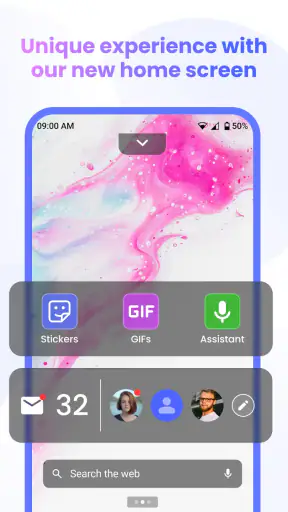
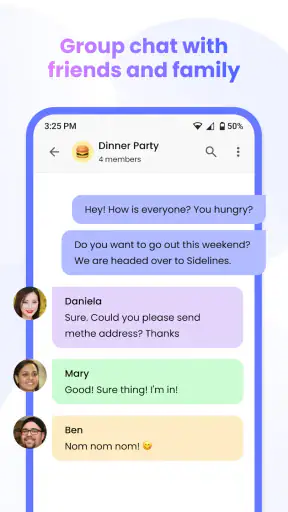
The central idea is to gather your messages in one place and make them available from the home screen. That can be useful when your communication is spread across different conversations and you do not want to remember which app contains a particular person. Instead of treating the home screen as a static page of icons, the app turns it into a more conversation-oriented starting point.
I found the concept most appealing for people who communicate in short bursts. If you regularly answer a family message, check a group conversation, and then return to work, a direct route to those chats is more valuable than a collection of decorative shortcuts. The app is also worth considering if you prefer seeing communication as the first thing available on your phone rather than opening a general-purpose inbox and sorting it out there.
The phrase “fast and private” should be understood as the app’s intended experience, not as a reason to abandon normal caution. A home-screen tool can make access quicker, but your conversations still involve the messaging services you use and the way your phone handles notifications, accounts, and screen security. I would still use a device lock and review the app’s behavior during setup instead of assuming that a convenient interface automatically changes the privacy model of every connected service.
There is also a visual trade-off. A conversation-focused home screen may feel calmer to someone who wants communication immediately available, but it may feel crowded to someone who likes a carefully arranged grid of apps. Before installing, ask yourself whether your home screen is a workspace, a launchpad, or a place where you want messages to be visible. This app makes the most sense in the first two cases, while a conventional launcher arrangement may suit the third better.
Who will notice the biggest improvement
I would recommend trying it if you switch between conversations throughout the day and often lose time locating the right thread. It is particularly suitable for someone who wants a single communication entry point without manually building a folder of messaging apps. It can also help a new Android user who finds separate inboxes confusing and wants a more direct route to people rather than services.
It is less compelling for a person who mainly uses one messenger, rarely sends messages, or already has a home-screen setup that opens important chats with one tap. In that situation, the app may add another layer instead of removing one. People who want extensive launcher customization, deep automation, or a complete replacement for their preferred messaging platforms should also look elsewhere. Messenger Chat Home is focused, and that focus is both its strength and its boundary.
Getting through the first setup without overthinking it
After installing, I would begin by treating setup as a sorting exercise rather than trying to redesign the entire phone immediately. Let the app show you what it can place within reach, then decide which conversations deserve priority. Starting with a small group is more useful than filling the screen with every chat you have ever opened.
My preferred first group would be the people I contact for practical reasons: a partner, a close family member, a work contact, or a group used for daily coordination. These chats give the app a fair test because they create repeated opportunities to notice whether the home-screen approach actually saves time. If you begin with inactive conversations, you may not learn much about the experience.
Pay attention to what happens when you select a conversation. The important question is not simply whether the chat appears, but whether the next step feels clear. You should be able to tell which conversation you are opening and which underlying messaging service will handle the interaction. If the route feels ambiguous, slow down and check the label or destination before sending anything important.
A useful setup habit is to keep your existing messaging apps available until you are comfortable. Do not remove familiar icons on the first day. For the first few interactions, compare the home-screen route with your usual method. This gives you a practical answer to the question that matters most: does the new arrangement reduce effort for your actual conversations, or does it merely look different?
Another small but important tip is to test the app at different moments, not only while the phone is freshly unlocked. Try it when you are returning from another app, when several notifications are waiting, and when you are in a hurry. A personalization tool earns its place through repeated everyday use, not through a pleasant first impression during a quiet setup session.
Your first meaningful success should be a real reply
For a first test, I would choose a conversation that needs a short, low-risk response. Unlock the phone, use the home-screen entry point, select the intended chat, and send a simple reply. Then repeat the same path later with another conversation. This is more revealing than browsing around because it tests the complete journey from home screen to useful action.
In a realistic scenario, imagine that you are leaving home and need to tell a family member that you will arrive later. With a normal setup, you might open the phone, identify the messaging app, search for the person, open the thread, and type the message. A conversation-centered home screen can shorten the recognition stage by putting the relevant route closer to the moment of action. The time saved may be modest, but repeated several times a day, the reduced mental effort is the real benefit.
I also like this workflow for messages that are easy to postpone. When a conversation is visible from the starting screen, it is harder to forget that you intended to answer. That does not mean the app becomes a task manager; it simply makes communication more present. I would use it for quick coordination, not for storing reminders or assuming that an unread chat will remain a reliable to-do list.
After the first successful reply, check whether the route remains understandable when you receive a response. A good habit is to open the conversation from the home screen, read the context, and then return to the same starting point. This helps you learn whether the layout supports both sending and checking messages, rather than only making one initial shortcut convenient.
The confusing parts are usually about roles and expectations
The most common misunderstanding is likely to be assuming that the app replaces the messaging services themselves. I would not think of it as a new inbox with independent conversations. Think of it as a communication-focused layer on the home screen. The service that actually carries the message remains important, and the available experience can vary depending on the conversations and apps already present on your phone.
That distinction also explains why one chat may feel more direct than another. If you use several messaging services, they may not all behave identically when opened from a shared starting point. A reader deciding whether to keep the app should judge it by the conversations they use most, not by expecting every service to offer an identical path.
Another possible source of friction is the difference between seeing a conversation and managing it. A home-screen view can help you reach a chat, but it does not automatically solve broader inbox problems such as old group threads, duplicate contacts, or messages that belong to different accounts. I would still organize those issues inside the relevant messaging apps when needed.
Privacy is another area where I would be deliberate. A visible conversation-oriented screen may be convenient, but it can also make communication more prominent when someone else can see your phone. Use a lock screen, be mindful of where you leave the device, and avoid placing sensitive conversations in a position where previews or names are unnecessarily exposed. The app’s convenience should support your habits, not replace them.
There is a practical learning curve as well. A conventional Android home screen is familiar to almost everyone, while a message-first arrangement asks you to change what you expect to see after unlocking. Give it a few real sessions before deciding. If you keep reaching for the old app icons, that is useful feedback rather than failure: it may mean your current workflow is already efficient.
How it compares with ordinary messaging shortcuts
The usual alternative is to keep separate messaging apps on the home screen, place them in a folder, or rely on notifications. That approach offers clear separation: you always know which service you are opening. It can also be better for people who need the full features, settings, contact tools, and account controls of a specific messenger immediately available.
Messenger Chat Home has a different advantage. It emphasizes people and conversations over app identity. If your main question is “who do I need to answer?” rather than “which service should I open?”, the unified approach is more natural. It can reduce the small decision of choosing an app before choosing a conversation, especially when your contacts are distributed across multiple places.
Notifications remain a strong alternative for spontaneous replies. They bring a new message to your attention without requiring a dedicated home-screen arrangement. However, notifications are temporary and easy to dismiss or overlook. A conversation-first home screen is more useful when you want important contacts available even before a new message arrives.
A standard launcher is the better choice if you want maximum control over icons, widgets, folders, and visual spacing. Messenger Chat Home is not something I would install merely for decoration. I would install it because I want communication to shape the first screen. That is a meaningful difference, and it clarifies who should skip it: anyone looking for a broad customization suite rather than a focused messaging workflow.
Small habits that make the app more useful
Start with the conversations that represent repeated actions, not necessarily the people you care about most. A frequently used practical group can reveal the app’s value faster than a close friend who sends one message a week. This is a non-obvious but important distinction: usefulness comes from interaction frequency and urgency, not only from emotional importance.
Keep the first arrangement intentionally limited. If every conversation competes for attention, the home screen becomes another inbox to scan. A smaller selection makes the app function as a decision aid: you see the chats most likely to require action and leave the rest inside their normal services. You can expand later if the initial setup proves helpful.
Use it as a bridge into conversations, not as a substitute for reviewing them. For longer discussions, group planning, or messages containing important details, I would still open the underlying service and verify the full context. The quick route is excellent for a short reply, but speed should not encourage sending an incomplete answer to a complicated thread.
Finally, reassess the arrangement after several days. Contacts change, group activity rises and falls, and a home screen that was useful during a busy week may become noisy later. Removing an inactive conversation is just as important as adding a new one. Treat the layout as a living shortlist rather than a permanent archive.
What to do after the first successful day
Once you have used the app for a real reply and a few conversation checks, decide whether it improves one of three things: speed, recall, or mental clarity. If it helps you reach frequent chats faster, remember replies you would otherwise miss, or avoid choosing between several messaging apps, it has earned a place on the phone. If none of those improvements appears, returning to your normal launcher is reasonable.
I would also ask whether the app fits the way you separate personal and professional communication. Some people benefit from having everything close together; others need visible boundaries between work groups, family chats, and private conversations. If a unified starting point blurs those boundaries, a conventional arrangement with separate folders may be safer and less distracting.
For a first-time Android user, the reassuring part is that the app does not need to become your entire phone strategy on day one. Begin with a few conversations, send one ordinary reply, and compare the steps with your old routine. That simple test tells you more than a long period of passive browsing.
My overall view is favorable, with a clear qualification: Messenger Chat Home is most valuable when your problem is finding conversations, not when your problem is lacking a messaging service. It offers a focused way to make communication the starting point of the device, and its free availability lowers the risk of trying it. The 4.3 average and over one million installs suggest that the idea has found a substantial audience, but your own routine should decide whether it stays.
I would recommend it to people who want their important chats closer, who switch between messaging services, or who often postpone quick replies because they cannot immediately find the right thread. I would skip it if your current launcher already gives you direct chat access, if you rarely message, or if you want extensive control over every part of the home screen. For the right user, the best result is not a dramatic new feature but a smoother path from unlocking the phone to completing a real conversation.


